AI Mind Map Generator: Create Visual Study Maps from Notes (2026)

MindLumos Team
2026-03-17
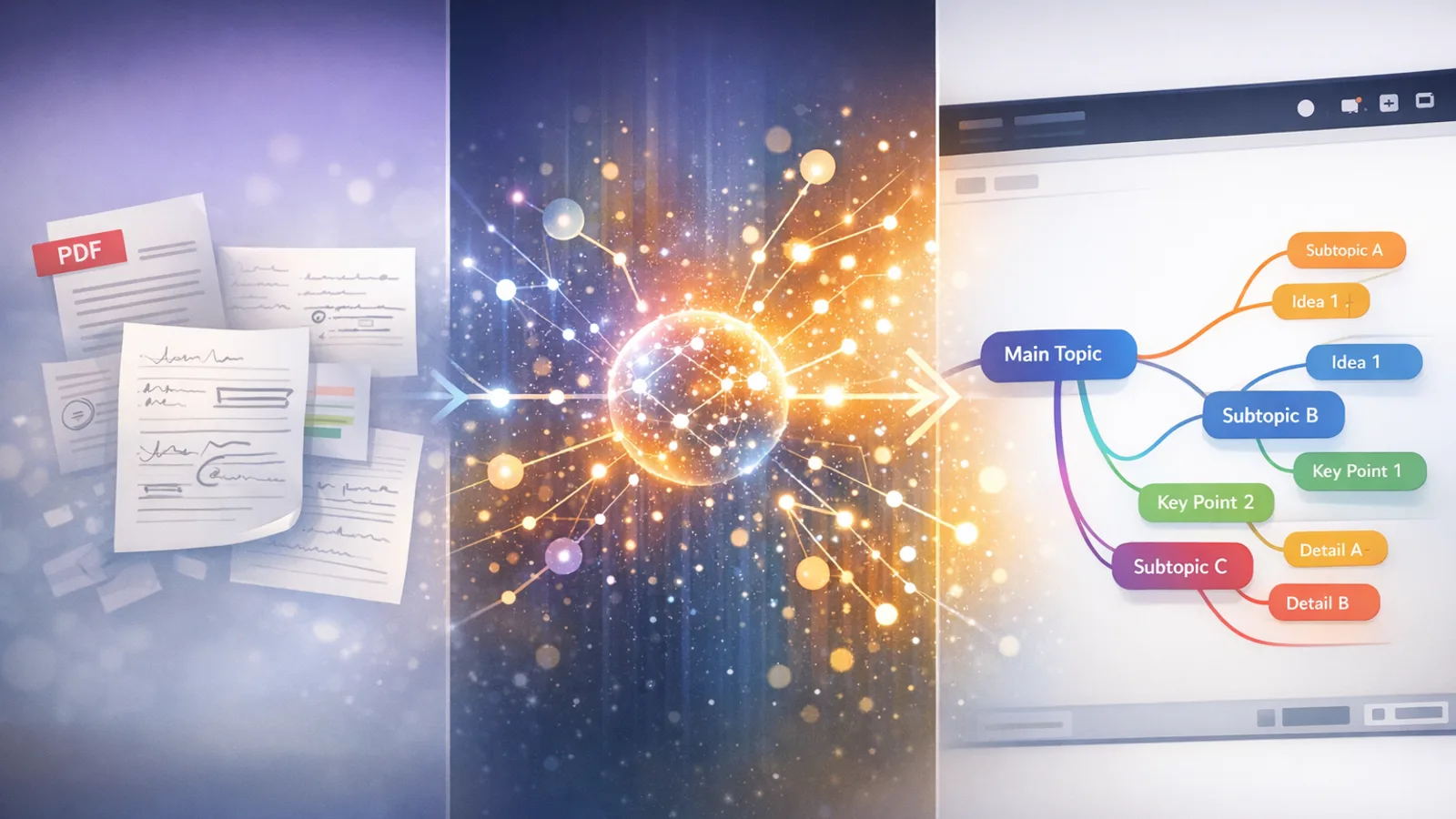
An AI mind map generator is a tool that automatically creates visual, branching diagrams from your notes, PDFs, or text—helping you see how concepts connect at a glance. Instead of spending hours manually dragging nodes around a canvas, you upload your material and get a structured visual map in seconds.
Mind maps are one of the most effective ways to study because they leverage dual coding—combining visual and verbal information to create stronger memory pathways. When you can see how ideas relate to each other, you understand and remember them better than reading linear notes ever allows.
This guide compares the best AI mind map generators in 2026, shows you how they work, and walks you through creating your first AI-generated mind map step by step.
💡 Quick tip: Want to study with more than just mind maps? See how to study with AI for a complete workflow that combines mind maps, flashcards, quizzes, and summaries.
 TL;DR: AI Mind Map Generators in 2026
- What they do: Turn PDFs, notes, text, or audio into visual, branching mind maps automatically
- Best all-in-one: MindLumos generates mind maps + flashcards + quizzes from the same source
- Why they work: Dual coding theory—visual + verbal processing strengthens memory
- Key advantage: Seconds instead of hours to organize complex information
- Pro tip: Combine mind maps with active recall (flashcards) for the strongest study system
 What Is an AI Mind Map Generator?
An AI mind map generator uses natural language processing to read your study materials—whether that's a PDF, a set of notes, or even a voice recording—and automatically build a visual diagram showing the main topics, subtopics, and how they connect. The difference from traditional tools comes down to automation.

Manual Mind Mapping
You drag, drop, and type every node yourself. Tools like Miro or Coggle give you a blank canvas—but the structure is entirely on you.

AI Mind Mapping
You upload a PDF, paste your notes, or even record audio—and the AI extracts key concepts, identifies relationships, and builds the map for you in seconds.
✨ No design skills needed—AI handles the layout and structure.
 How Do AI Mind Map Generators Work?
The process is straightforward regardless of which tool you use. Here's what happens behind the scenes:

Upload Your Source Material
Drop in a PDF, paste text from your notes, upload an image of a whiteboard, or even record audio from a lecture.
AI Identifies Key Concepts
Natural language processing extracts the main topics, subtopics, and how they relate to each other.

Visual Map Is Generated
The AI arranges everything into a branching, hierarchical mind map you can see at a glance.

Review, Edit & Customize
Rearrange branches, add your own notes, change colors, and export or share your finished map.
 Best AI Mind Map Generators Compared (2026)
We tested the top AI mind map tools and compared them on input flexibility, AI quality, pricing, and whether they integrate with other study methods.
| Tool | Best For | Input Types | Price |
|---|---|---|---|
| MindLumosTop Pick | All-in-one studying (mind maps + flashcards + quizzes) | PDF, images, audio, text | Free tier available |
| Miro AI | Collaborative whiteboarding with AI-assisted mapping | Text, templates | Free plan (limited); Starter from $8/mo |
| Coggle | Simple, clean mind mapping with real-time collaboration | Text | Free (3 diagrams); $5/mo for unlimited |
| Xmind AI | Desktop-focused mind mapping with templates | Text, templates | Free basic; Pro from $5/mo |
| GitMind | Free AI-powered mind mapping | Text | Free; Pro from $4.17/mo |
MindLumos
Best OverallAll-in-one studying (mind maps + flashcards + quizzes)
Generates mind maps AND other study tools from the same source material.
Free tier available
Miro AI
Collaborative whiteboarding with AI-assisted mapping
Best for teams and brainstorming sessions.
Free plan (limited); Starter from $8/mo
Coggle
Simple, clean mind mapping with real-time collaboration
Easiest learning curve for beginners.
Free (3 diagrams); $5/mo for unlimited
Xmind AI
Desktop-focused mind mapping with templates
Polished desktop experience with rich template library.
Free basic; Pro from $5/mo
GitMind
Free AI-powered mind mapping
Generous free tier with AI generation built in.
Free; Pro from $4.17/mo
Why Use AI Mind Maps for Studying?
Mind maps aren't just a prettier way to take notes—they're backed by learning science. Here's why they work so well for studying:

See the Big Picture
Concepts and relationships at a glance—no scrolling through pages of linear notes. One visual map shows how everything connects.

Faster Than Manual
What takes hours to organize by hand takes seconds with AI. Upload your source, and the structure appears instantly.
Multi-Format Input
PDFs, typed notes, images of handwritten notes, audio recordings—AI mind map generators handle them all.
Better Memory Retention
Dual coding theory: combining visual (the map) with verbal (the text) information creates two memory pathways instead of one.

Connect Ideas Across Topics
See unexpected links between subjects. Mind maps reveal patterns your linear notes never could.

The Science: Dual Coding Theory
Cognitive research shows that when you encode information through two channels—visual (diagrams, maps, images) and verbal (words, text)—you create redundant memory pathways. This means if one pathway fades, the other still holds. Mind maps naturally combine both channels, which is why they consistently outperform linear note-taking for retention.
How to Create a Mind Map with AI (Using MindLumos)
Here's a step-by-step walkthrough of creating an AI mind map with MindLumos. The process takes under a minute.
Upload Your Notes, PDF, or Paste Text
Drag in a file or paste directly—MindLumos accepts PDFs, images, audio, and plain text.
Select "Mind Map" as Your Output Format
Choose mind map from the available study tool options (you can also generate flashcards, quizzes, and summaries from the same upload).
AI Generates a Structured Visual Map
In seconds, MindLumos extracts key concepts and arranges them into a branching, color-coded mind map.
Review Branches and Customize
Expand or collapse branches, add your own connections, and reorganize the layout to match how you think.
Combine with Flashcards and Quizzes
Use the same source material to generate flashcards for active recall and quizzes for self-testing—a complete study system from one upload.
One upload. Multiple study tools.
The same material that generates your mind map can also create flashcards, quizzes, summaries, and audio study guides—all without re-uploading.
AI Mind Map Generator: PDF vs. Text vs. Audio
Different source materials work better in different situations. Here's when to use each input type:
PDF Documents
Best For
Textbooks, research papers, lecture slides
Advantage
AI extracts headings, key terms, and structure automatically
💡 Tip: Works best with text-based PDFs (not scanned images without OCR)

Text / Notes
Best For
Class notes, study guides, copied web content
Advantage
Fastest processing—paste and generate instantly
💡 Tip: Use headers or bullet points in your notes for better AI structure

Audio Recordings
Best For
Lectures, study group discussions, voice memos
Advantage
Captures ideas you might miss while writing
💡 Tip: Speak clearly and mention topic transitions for better mapping

Images
Best For
Whiteboard photos, handwritten notes, diagrams
Advantage
Turns physical notes into digital, structured maps
💡 Tip: Ensure good lighting and legibility for best results
 Tips for Getting Better AI Mind Maps
AI mind map generators are powerful, but the quality of your output depends on how you use them. These tips will help you get the best results.
Use Clear, Structured Notes
The better your input, the better the output. Use headings, bullet points, and clear topic sentences so the AI can identify hierarchy.
Focus on One Topic per Mind Map
A mind map about "all of biology" will be overwhelming. Focus on a single chapter, lecture, or concept for the most useful maps.
Combine with Other Study Tools
Mind maps show the big picture. Pair them with flashcards for memorization and quizzes for self-testing to cover all learning angles.
Review and Add Your Own Connections
AI gives you a strong starting point, but your own insights matter. Add branches, notes, and cross-links that reflect your understanding.
 Common Mistakes to Avoid
Trying to Map Everything at Once
Dumping an entire textbook into one mind map creates visual noise, not clarity. The map becomes too dense to be useful.
✅ Fix: Break material into chapters or topics. One focused mind map per concept beats one overwhelming mega-map.
Not Reviewing the AI Output
AI is fast but not perfect. It might group concepts differently than you would, or miss nuanced relationships.
✅ Fix: Always review the generated map. Edit branches, merge duplicates, and add missing connections.

Using Mind Maps Passively
Just looking at a mind map isn't studying—it's the same trap as re-reading notes. Passive review creates an illusion of knowledge.
✅ Fix: Use the map actively: cover branches and try to recall them, convert branches into flashcards, or quiz yourself on the connections.
Frequently Asked Questions
What is the best AI mind map generator?
MindLumos is the best all-in-one AI mind map generator for studying, as it creates mind maps plus flashcards, quizzes, and summaries from the same source material. For collaborative whiteboarding, Miro AI is a strong option, and Coggle is ideal for simple, clean maps.
Can AI generate a mind map from a PDF?
Yes, tools like MindLumos can take a PDF document and automatically extract key concepts, then arrange them into a visual mind map. The AI identifies headings, key terms, and relationships to build the structure for you.
Are AI mind map generators free?
Many AI mind map generators offer free tiers. MindLumos lets you try free mind map generation. Coggle offers 3 free diagrams, and GitMind has a generous free plan with AI features built in.
How do AI mind maps help with studying?
AI mind maps help you see relationships between concepts, which improves understanding and memory retention through dual coding—combining visual processing (the map) with verbal processing (the text). They also save hours of manual organization time.
Conclusion: See Your Knowledge, Don't Just Read It
AI mind map generators have transformed how students organize and understand complex material. Instead of spending hours manually arranging concepts, you can upload your notes and get a structured visual overview in seconds—then focus your energy on actually learning the content.
The best approach combines mind maps with other study methods: use the map to see the big picture, flashcards for active recall, and quizzes for self-testing. Tools like MindLumos let you generate all of these from a single upload, so you don't have to jump between apps.
🎯 Your next step: Upload one set of notes or a PDF and generate your first AI mind map. Notice how seeing the structure changes the way you understand the material.
Continue Reading
AI Quiz Generator: Create Practice Tests from Notes & PDFs (2026)
The best AI quiz generators create practice tests from your notes and PDFs in seconds. Compare top tools and learn to generate quizzes with AI.

AI Study Guide Maker: Generate Study Guides from Notes Automatically (2026)
The best AI study guide makers generate organized study guides from your notes and PDFs in seconds. Compare top tools and create guides with AI.